 BrandStills
 jewelry product photography
Product photography for jewelry makers
Jewellery is small, shiny and hard to light: the two failures are a dull metal and no sense of scale. BrandStills puts your piece on a proper studio set while keeping the stone, the finish and the clasp exactly as photographed.
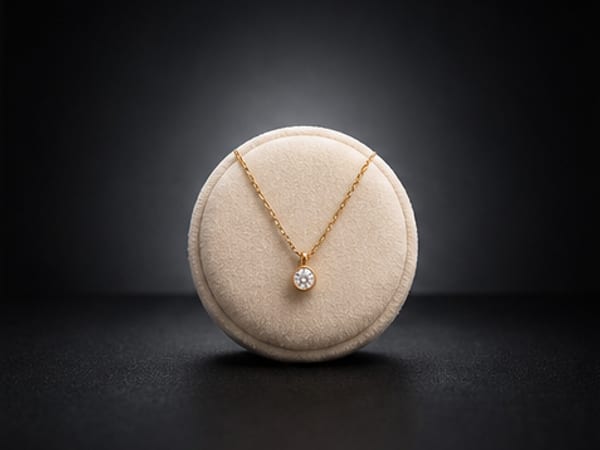
Jewellery photography punishes the two things a phone is worst at: tiny subjects and reflective surfaces. A ring shot on a kitchen counter comes out grey, slightly soft, and floating in a frame with no sense of how big it actually is.
The failures worth naming
- Dead metal. Polished silver and gold need something bright to reflect. In a dim room they reflect nothing and read as grey plastic.
- Missing scale. “I thought it was bigger” is the most common jewellery return, and it is a photography problem.
- Soft focus. Phones focus on the surface, not the stone, at close range.
- Busy backgrounds. At this size, anything in the frame competes with the piece.
Getting a usable reference photo
Lay the piece on a plain mid-tone surface, such as a grey card or a matte tile, near a window but out of direct sun. Take one straight-down shot, one at a low angle so the profile and setting are visible, and one close-up of the clasp, hallmark or stone setting. Do not chase perfect lighting; the app is reading the shape, finish and stone, not copying your light.
Then choose the set: a dark studio backdrop for warm metals, a colour block for playful pieces, a podium for a hero image, a flat-lay with small props for a gift listing.
Pair every generated shot with one real worn shot
This is the honest limit of any generated product photo, and it happens to be the thing that sells jewellery: a piece on a real hand, wrist or ear. Use the app for the clean studio images and the styled sets, and shoot one worn photo yourself for scale. A listing with both converts better than one with either.
A matched set across the whole collection
Rings, studs and pendants photographed on different days never look like one shop. Because each piece stays in the library, you can render a whole collection into the same scene, with the same light and the same backdrop, in one sitting, then re-render the lot when you rebrand.
Frequently asked questions
Should jewelry be photographed on a white or a dark background?
Use white or a light neutral for marketplace thumbnails, where clarity wins, and a dark backdrop for hero images of gold, brass and gemstones, where contrast makes the metal glow. Many shops publish both.
How do I show the size of a ring or pendant in a photo?
A worn photo is the clearest scale cue, followed by the piece next to a familiar object. Generated studio shots should be paired with at least one real photo on a hand, wrist or neck.
Why does my gold jewelry look grey in photos?
Phones white-balance for the dominant surface, which is usually a bright background, and that drains warmth from metal. Shoot against a mid-tone surface in indirect daylight, and avoid mixing warm bulbs with window light.
Related guides
Etsy listings live or die in a 300-pixel thumbnail. BrandStills turns the phone photos you already have into clean studio and lifestyle shots of your real item, with the label, the stitching and the glaze all intact.
Product photography for skincare and cosmetics brandsSerum bottles and cream jars are sold on surface: gloss, glass, water, clean light. BrandStills builds those scenes around the bottle you photographed, with your label and cap kept exactly.
Product photography for candle makersCandles are the hardest easy product to photograph: amber glass throws back every reflection and a phone flattens the flame. BrandStills relights your jar in a room that suits it, with your label and lid unchanged.
Last updated August 25, 2026.
Shoot once. Post all year.
Install BrandStills, add one product, and have your first studio photo before your coffee cools.
Free credits on install · Start in a minute