 BrandStills
 candle product photography
Product photography for candle makers
Candles are the hardest easy product to photograph: amber glass throws back every reflection and a phone flattens the flame. BrandStills relights your jar in a room that suits it, with your label and lid unchanged.
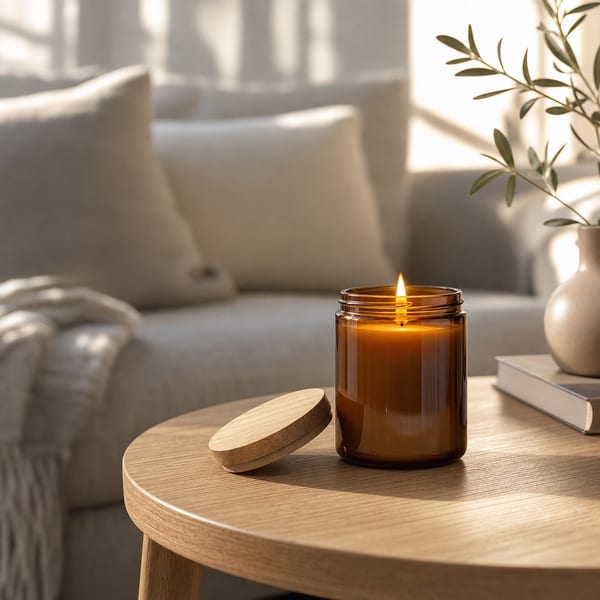
An amber jar is a mirror. Point a phone at one under a ceiling light and you get three bright rectangles across the glass, a grey wall behind it, and a wax surface that looks like porridge. The product is beautiful; the photo is not.
What actually goes wrong
- Hard light sources reflect. A bulb, a window frame, your phone: any small bright thing lands on the curve of the glass as a distracting streak.
- Flames blow out. Phone exposure meters read the flame as the subject and drop everything else into darkness, so you get a bright dot in a black frame.
- Amber shifts colour. Warm indoor bulbs push amber toward orange and pale soy wax toward yellow, so the candle a buyer receives looks different to the one they saw.
- Context is missing. A candle sells a room, not an object. On a bare table it is a jar.
Shoot the reference, not the hero
The trick is to stop trying to take the finished photo. Take an informative one instead:
- Unlit, straight on, near a window, no flash, so the label is legible.
- A second at about 30° so the curve of the glass and the shoulder of the jar are visible.
- One of the lid; wooden discs and brushed metal read completely differently in a render.
Then pick a scene: a sunlit living room for cosy, a stone tier for luxury, a flat-lay with dried grasses for a gift listing, a fireside or pine scene for Christmas. The render keeps your jar, your wax colour, your lid and your label, and gives you the light you could not build on a Tuesday evening.
Seasons are where candles make their money
Candle sales are a Q4 business, and every year the same problem arrives: the range is finished in October and the photos are not. Because your products stay in the app’s library, a Christmas set is a handful of taps against the products you already added, not a second shoot. Same for a Valentine’s set, a spring set, an autumn set.
Whole-range shots without cloning
A collection scene such as stepped podiums, a lineup or a leaning stack puts three or six scents in one frame with each label rendered as itself. That is the shot for a shop banner or a bundle listing, and the one that is most tedious to build by hand.
Ready to try it on your own jars? Get the app, or read how it works first.
Frequently asked questions
Should candle photos show the candle lit or unlit?
Show both. The lit shot sells the mood and belongs in your lifestyle images; the unlit shot shows the wax colour, the wick and the fill level, and works better as a clean primary thumbnail.
How do I stop reflections in amber glass?
Reflections come from small hard light sources: a ceiling bulb, a phone screen, a window frame. Shoot in soft indirect daylight, keep bright objects out of the arc in front of the jar, and turn the label away from the strongest highlight.
Can I generate a candle photo with the flame lit from an unlit photo?
Yes. Photograph the jar unlit and clearly, then pick a warm lifestyle scene; the render can show it lit while keeping your jar, lid and label exactly as photographed.
Related guides
Etsy listings live or die in a 300-pixel thumbnail. BrandStills turns the phone photos you already have into clean studio and lifestyle shots of your real item, with the label, the stitching and the glaze all intact.
Product photography for skincare and cosmetics brandsSerum bottles and cream jars are sold on surface: gloss, glass, water, clean light. BrandStills builds those scenes around the bottle you photographed, with your label and cap kept exactly.
Product photography for jewelry makersJewellery is small, shiny and hard to light: the two failures are a dull metal and no sense of scale. BrandStills puts your piece on a proper studio set while keeping the stone, the finish and the clasp exactly as photographed.
Last updated August 25, 2026.
Shoot once. Post all year.
Install BrandStills, add one product, and have your first studio photo before your coffee cools.
Free credits on install · Start in a minute